
In today’s modern web development world, building fast, scalable, and efficient backend applications is more important than ever. JavaScript is no longer limited to browsers only; with Node.js, developers can build powerful server-side applications. One of the most popular frameworks built on top of Node.js is Express.js.
Express.js is lightweight, flexible, and extremely powerful. It has become the backbone of thousands of web applications, REST APIs, and backend systems used by startups and large enterprises alike.
In this blog, we will explore what Express.js is, why it is used, how it works, its features, advantages, architecture, real-world use cases, and best practices. Whether you are a beginner or an experienced developer, this guide will help you understand Express.js in depth.
What is Express.js?
Express.js is a minimal and flexible web application framework for Node.js. It provides a robust set of features to build single-page applications, multi-page websites, and RESTful APIs.
In simple words, Express.js helps you:
- Handle HTTP requests and responses
- Define routes easily
- Manage middleware
- Build APIs faster
Without Express, writing a backend in Node.js would require a lot of repetitive and complex code using the core http module. Express simplifies this process and makes backend development faster and cleaner.
Why Express.js is So Popular
Express.js is one of the most widely used backend frameworks in the JavaScript ecosystem. The reasons behind its popularity include:
- Minimal and Lightweight
Express does not force strict rules or heavy structure. You are free to design your application the way you want. - Fast Development
Routing, middleware, and request handling are simple, allowing developers to build applications quickly. - Large Ecosystem
Thousands of middleware packages are available for authentication, logging, security, file uploads, and more. - Strong Community Support
Because Express is widely used, finding tutorials, solutions, and libraries is easy. - Perfect for APIs
Express is ideal for building REST APIs and backend services for web and mobile apps.
How Express.js Works
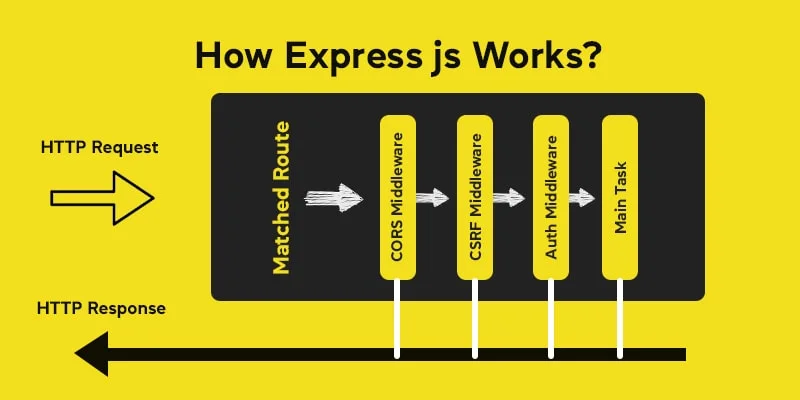
Express.js works on top of Node.js and uses the request-response cycle.
- A client (browser or mobile app) sends an HTTP request
- Express receives the request
- Middleware processes the request
- The request reaches a route handler
- A response is sent back to the client
This simple flow makes Express easy to understand and debug.
Installing Express.js
Before using Express, you need Node.js installed on your system.
Step 1: Initialize a Node.js project
npm init -y
Step 2: Install Express
npm install express
Step 3: Create a basic server
const express = require("express");
const app = express();

app.get("/", (req, res) => {
  res.send("Hello World");
});

app.listen(3000, () => {
  console.log("Server running on port 3000");
});
With just a few lines of code, you have a working web server.
Core Features of Express.js
1. Routing
Routing determines how your application responds to different URLs and HTTP methods.
app.get("/users", (req, res) => {
  res.send("User list");
});

app.post("/users", (req, res) => {
  res.send("User created");
});
Express supports all HTTP methods:
- GET
- POST
- PUT
- DELETE
- PATCH
2. Middleware
Middleware functions execute between the request and the response. They are used for:
- Authentication
- Logging
- Validation
- Error handling
Example:
app.use((req, res, next) => {
  console.log("Request received");
  next();
});
Middleware is one of the most powerful features of Express.js.
3. Request and Response Handling
Express provides helpful methods to handle requests and responses:
req.paramsreq.queryreq.bodyres.send()res.json()res.status()
This makes data handling clean and readable.
4. REST API Development
Express is widely used for building REST APIs.
Example:
app.get("/api/products", (req, res) => {
  res.json({ products: [] });
});
This is why Express is popular in mobile apps, frontend frameworks, and microservices.
5. Template Engines
Express supports template engines like:
- EJS
- Pug
- Handlebars
This allows you to build server-rendered web pages easily.
Express.js Architecture
A typical Express application follows this structure:
project/
│── controllers/
│── routes/
│── models/
│── middleware/
│── app.js
│── package.json
Explanation:
- Routes: Define application URLs
- Controllers: Business logic
- Models: Database logic
- Middleware: Authentication, validation, logging
This structure helps in building scalable and maintainable applications.
Express.js vs Plain Node.js
| Feature | Node.js | Express.js |
|---|---|---|
| Routing | Manual | Built-in |
| Middleware | No | Yes |
| Code Complexity | High | Low |
| Speed of Development | Slow | Fast |
Express.js simplifies Node.js development significantly.
Common Use Cases of Express.js
Express.js is used in many real-world applications:
- REST APIs
Backend for React, Angular, Vue, and mobile apps. - Web Applications
Server-side rendered websites. - Microservices
Lightweight services in distributed systems. - Real-Time Apps
Combined with WebSockets and Socket.io. - Admin Panels and Dashboards
Security in Express.js
Security is important for backend applications. Express provides flexibility to implement security using middleware.
Common security practices:
- Use
helmetfor HTTP headers - Validate user input
- Use authentication middleware
- Protect routes
- Handle errors properly
Example:
const helmet = require("helmet");
app.use(helmet());
Performance and Scalability
Express is fast and efficient. For large applications:
- Use clustering
- Use caching (Redis)
- Optimize database queries
- Use asynchronous code properly
Express works very well with modern scalable architectures.
Best Practices in Express.js
- Keep routes clean and small
- Use controllers for logic
- Handle errors globally
- Use environment variables
- Validate all user input
- Avoid blocking code
- Write modular middleware
Following these practices keeps your code professional and production-ready.
Express.js in Real-World Projects
Most modern JavaScript backend stacks use Express.js along with:
- Frontend frameworks (React, Vue)
- Databases (MySQL, MongoDB, PostgreSQL)
- Authentication systems
- Payment gateways
- Cloud platforms
Because Express is unopinionated, it fits easily into any project.
Advantages of Express.js
- Easy to learn
- Flexible architecture
- Huge middleware ecosystem
- Fast development
- Strong community
- Perfect for APIs
Limitations of Express.js
- No strict structure (can cause messy code if not disciplined)
- Requires good architectural decisions
- Not suitable for very opinionated frameworks lovers
However, these limitations can be solved by following good practices.
Future of Express.js
Even with newer frameworks available, Express.js remains relevant because:
- It is stable and mature
- It powers millions of applications
- It has long-term community support
Many newer frameworks are still built on top of Express concepts.